
Choose Sling Orange if ESPN and Disney-owned channels drive your viewing. Choose Sling Blue if your household needs multiple screens running at once plus Fox, NBC, or local channels. Choose the Orange + Blue combo if you want both and don’t mind paying roughly $65.99 a month for four total streams instead of one or three.
TL;DR:
- Sling Orange is best for viewers who mainly want ESPN and do not need multiple streams or local channels.
- Sling Blue suits households with multiple devices, offering three simultaneous streams and access to local broadcast networks in supported areas.
- Availability of local channels varies by ZIP code, which affects the channel lineup and should be verified before subscribing.
- Upgrading to add-ons like Sports Extra or premium channels can significantly alter the monthly bill beyond the base prices.
Table of Contents
- Sling Orange vs Blue: A Quick Side-by-Side Look
- Which Channels Do You Lose by Picking the Wrong Plan?
- What Does Each Plan Actually Cost You Once Add-Ons Are Factored In?
- How to Decide Between Orange, Blue, or Both
- My Take: Skip the Overthinking and Match the Plan to Your Habits
- Looking for a Different Trade-Off? Here’s the IPTV Alternative
- Sources
- FAQ
Sling Orange vs Blue: A Quick Side-by-Side Look
The fastest way to see the split is to line up the numbers. Sling Orange runs about $45.99 a month for a single stream and an ESPN-heavy lineup. Sling Blue costs closer to $50.99 a month but gives you three simultaneous streams and a broader mix of entertainment and local channels. Combine them and you’re at roughly $65.99 a month for four streams and both channel lineups at once.
A few quick takeaways once you’ve scanned the table:
- Sling Orange fits a single sports fan who mostly wants ESPN and doesn’t need more than one screen running.
- Sling Blue fits a household juggling multiple TVs or devices at once, especially if local broadcast access matters.
- Orange + Blue fits anyone who’s tired of choosing and wants both lineups without a second subscription elsewhere.
- Sling Freestream fits cord-cutters testing the waters who don’t mind ads in exchange for a free, no-commitment channel library.
One catch worth flagging early: local channel availability changes by ZIP code, so the “50+ channels” figure for the combo plan can look different depending on where you live.
Which Channels Do You Lose by Picking the Wrong Plan?
The real decision isn’t about total channel count. It’s about which handful of channels actually matter to you, because Orange and Blue split sports and broadcast content in a way that catches a lot of new subscribers off guard.
Sling Orange carries the ESPN family (ESPN, ESPN2, ESPNU depending on availability) along with Disney Channel and other Disney-owned properties. If your remote lives on ESPN during football season, this is the plan built around that habit.
Sling Blue skips ESPN entirely but picks up Fox-owned networks, Bravo, USA, and MSNBC, plus local ABC, FOX, and NBC affiliates in supported markets. That local broadcast access is a bigger deal than it sounds. It’s the difference between watching your hometown news at 6 p.m. and not being able to at all.
Here’s where it gets awkward for sports fans specifically:
- Want ESPN for college football and NBA coverage? You need Orange.
- Want Fox’s NFL windows, local affiliates, or MLB games on broadcast networks? You need Blue.
- Want both without gaps? You need the combo, because neither plan alone covers the full sports calendar.
Pro Tip: Channel lineups shift throughout the year as licensing deals change. Always run your ZIP code through Sling’s official channel checker before you commit, since a network listed as “available” in a national review might not show up in your specific market.
For general entertainment viewers who don’t care about live sports at all, Blue often ends up the stronger single-plan pick simply because it packs in more news and lifestyle programming alongside those local stations.
What Does Each Plan Actually Cost You Once Add-Ons Are Factored In?
The sticker price is just the starting point. Here’s what shapes your real monthly bill:
- Base plans: Orange at roughly $45.99, Blue at roughly $50.99, and the combo at roughly $65.99. Buying the combo saves you a few dollars a month compared to paying for both plans separately at their individual rates.
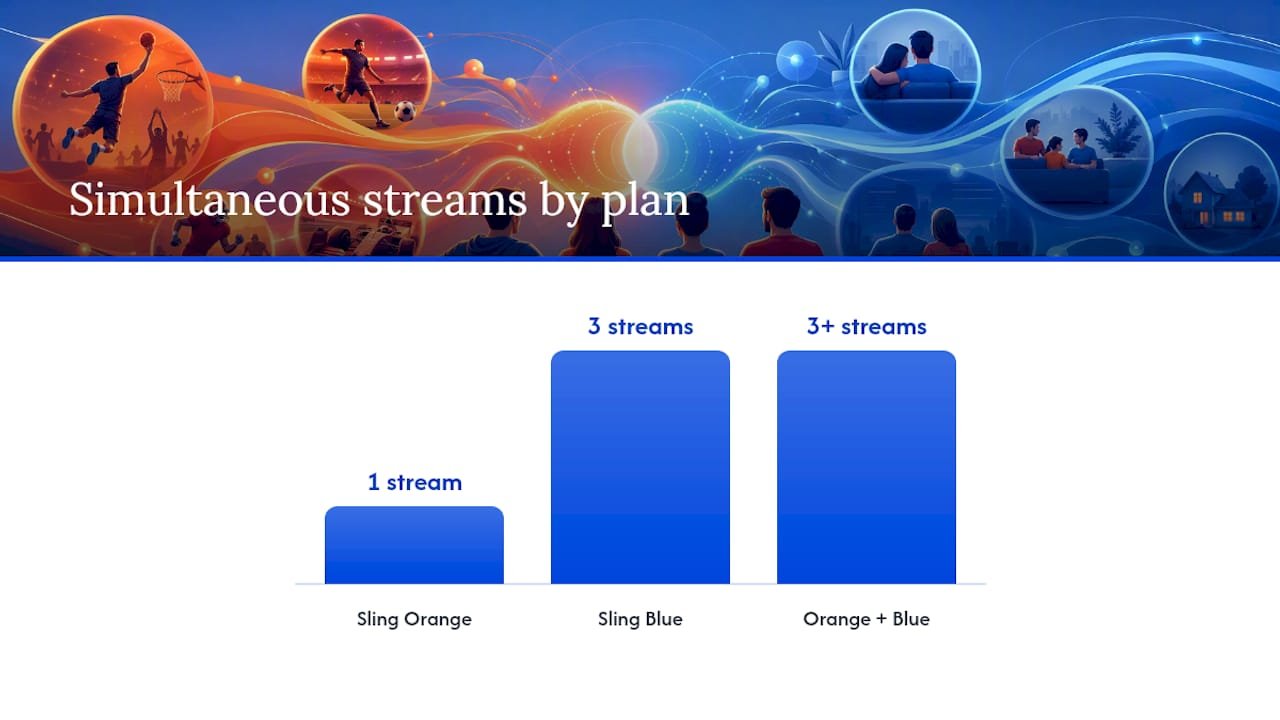
- Stream limits by household size: Orange gives you exactly one stream. Blue gives you three. The combo bumps that to four, which matters if you’ve got a household where the kids, the living room TV, and a parent’s tablet are all running different things simultaneously.
- Cloud DVR: every plan includes 50 hours of cloud storage by default, with an unlimited DVR upgrade available for an extra monthly fee if you record a lot of live sports or serialized shows.
Add-ons that change the math:
- Sports Extra adds regional sports networks, extra soccer and college coverage, and additional ESPN properties for an extra monthly charge.
- Premium channel packs (Starz, Epix, and similar) stack on top of either base plan.
- ESPN+ is worth pricing out separately. Comparing Blue plus ESPN+ against the full Orange + Blue combo sometimes lands cheaper for viewers who want ESPN content but don’t need Orange’s live linear feed.
Check Sling’s site for current promotional pricing before you sign up. Deals shift often enough that the “official” price and the “actual” price you’ll pay in your first month can differ.
How to Decide Between Orange, Blue, or Both
Run through these five questions before you subscribe:
- Do you need ESPN? If yes, Orange or the combo is non-negotiable.
- How many streams do you need running at once? One works for Orange; three or more points you toward Blue or the combo.
- Do local channels matter to you? If local news or broadcast primetime matters, Blue’s local affiliate access (where supported) is the deciding factor.
- What’s your monthly budget? A single-stream Orange subscription is the cheapest way in; the combo is the most expensive but covers the most ground.
- Would ESPN+ solve your gap for less? If you only need occasional ESPN content, pairing Blue with ESPN+ might undercut the combo’s price.
To check your specific market, head to Sling’s official site and run your ZIP code through their channel lookup tool before you decide anything. Switching plans later is done right inside your Sling account settings, and combining Orange and Blue after the fact usually takes just a couple of clicks rather than a full new signup.
Pro Tip: Look for a discounted first month or short trial promotion before committing to the combo. It’s the cheapest way to confirm your local channels actually show up as advertised.
Why Sports Fans Specifically Get Stuck in the Middle
Sling’s regional sports network coverage is thin compared to cable, which hits MLB, NHL, and NBA fans harder than NFL or college football fans. If your team’s games air on a regional sports network, neither Orange nor Blue alone may deliver it, and even the combo has gaps that Sports Extra doesn’t fully close. For casual viewers, Orange plus occasional ESPN+ access covers most needs. For diehard regional sports fans, it’s worth checking whether your specific team’s broadcasts are covered at all before paying for anything.
My Take: Skip the Overthinking and Match the Plan to Your Habits
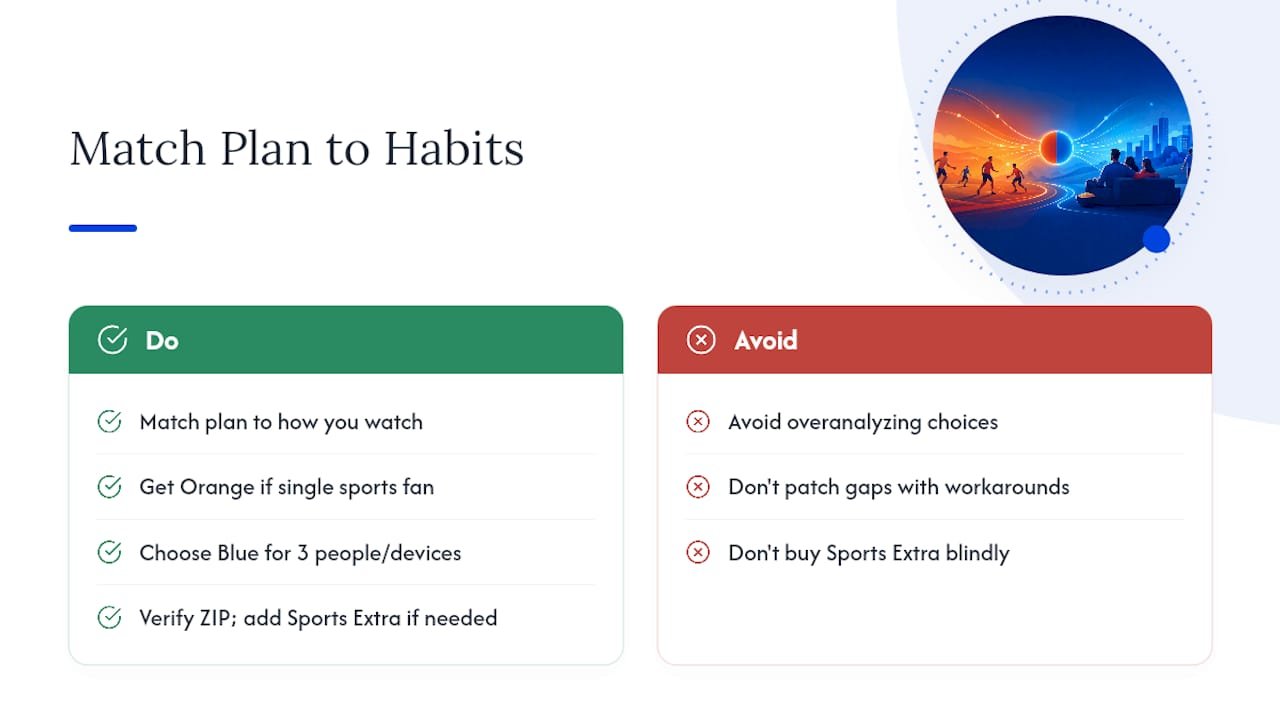
Most of the hand-wringing over Orange vs Blue disappears once you’re honest about how you actually watch TV. A single sports fan living alone should just get Orange and stop overanalyzing it. A household with three people and three devices should get Blue, full stop, because the extra streams matter more than any one channel. Anyone who wants both worlds and can stomach the combo price should get Orange + Blue rather than trying to patch gaps with workarounds.
The one step people skip is checking their own ZIP code before buying. Local channel access varies enough that what worked for your neighbor’s review online might not apply to your address. Run the five questions above, verify your market, and add Sports Extra only if you’ve confirmed you actually need it.
— ANASS
Looking for a Different Trade-Off? Here’s the IPTV Alternative
Sling’s plan structure works well for cord-cutters who want a single national provider, but it isn’t the only route if you want more flexibility on device support or local channel strategy without splitting your subscription across two plans. There are legal IPTV services built around broader channel access and clearer setup paths, which can matter if you’ve found Sling’s Orange and Blue split more restrictive than expected for your specific market.
If channel gaps or local availability are the reason you’re still comparing plans, our guide to legal IPTV services worth choosing in the USA breaks down providers by device compatibility, pricing tiers, and content coverage. For readers who want to see how these options stack up against traditional streaming bundles side by side, start with a comparison of top live TV streaming services for 2026 to see which approach actually fits your setup and your channel priorities.
Sources
- Sling TV Orange vs Blue: Prices, Channels & Best Plan for 2026
- Sling TV Review 2026 | Channels, Packages and More
Channel lineups shift by region, so treat Sling’s own ZIP code lookup as the final word over any third-party list, including this one.
FAQ
Is the USA Network on Sling Blue or Orange?
USA Network is included on Sling Blue, not Orange, as part of Blue’s broader entertainment and news channel lineup.
Does Sling Orange Include USA Network?
No. Sling Orange focuses on ESPN and Disney-owned channels, so viewers who want USA Network need Blue or the Orange + Blue combo.
Can I Switch From Sling Orange to Sling Blue?
Yes, you can switch plans directly inside your Sling account settings, and many users combine both into the Orange + Blue package instead of switching outright.
Why Is Sling TV Losing Customers?
Cord-cutting competition and gaps in regional sports coverage are common factors cited in industry reviews, particularly for MLB, NHL, and NBA fans whose local teams air on regional sports networks Sling doesn’t carry.