

YouTube TV carries more than 100 channels in its main plan, including ABC, CBS, NBC, FOX, and a wide sports lineup built around ESPN and its family of networks. Your exact local channels depend on your ZIP code, and sports fans can layer on add-ons like Sports Plus for NFL RedZone. The rest comes down to your address and how much sports coverage you need.
TL;DR:
- Local broadcast channels like ABC, CBS, NBC, and FOX are assigned based on your ZIP code, so availability varies by location and must be verified in your account settings.
- Regional sports networks may not be available in all markets due to carriage deal restrictions, and some major sports channels like NFL RedZone require additional add-ons like Sports Plus.
- Missing channels such as A&E, Lifetime, or Cooking Channel are often due to changing carriage agreements, so checking your ZIP-specific lineup before canceling is essential.
- To confirm your exact channel lineup, enter your ZIP code on the YouTube TV website or app and verify account location and device permissions beforehand.
- Comparing streaming services should include consideration of local coverage accuracy, sports add-ons, and regional restrictions rather than just channel count, especially when assessing cost and value.
Table of Contents
- 1. Full channel breakdown by category
- 2. How local channels work and what’s typically included
- 3. Sports channels and how the sports plan options work
- 4. Notable channels commonly missing from YouTube TV
- 5. How to check your exact lineup and fix common issues
- 6. How we think about channel composition when comparing services
- 7. Compare plans before you commit to one service
- Sources
- FAQ
1. Full channel breakdown by category
The base plan is built to cover most of what a cable subscriber would expect without splitting content across a dozen tiers. YouTube TV’s main plan includes more than 100 channels and covers major broadcast networks alongside a broad mix of cable staples, and you can browse the full set through the Search or Live tabs in the app.
Here’s what a typical lineup looks like across common categories:
- Local broadcast: ABC, CBS, NBC, FOX, and The CW, subject to availability in your market.
- Sports: ESPN, ESPN2, FS1, NBC Sports, and NFL Network, with regional sports networks (RSNs) layered in where carriage deals allow.
- News: CNN, FOX News, and MSNBC for round-the-clock coverage.
- Kids: Disney Channel and Nickelodeon for family programming.
- Movies: AMC, TNT, and TCM for film libraries and classic reruns.
- Lifestyle: HGTV and Food Network for home and cooking content.
Beyond the base plan, YouTube TV offers premium add-ons for viewers who want more. Showtime and STARZ are available as paid extras, and sports fans can add Sports Plus for additional coverage that includes NFL RedZone. None of these show up in the standard price, so they’re worth checking before you assume they’re bundled in.
Because the exact roster shifts by region and by the deals YouTube TV has in place at any given time, the smartest move is to check your own ZIP-specific list directly. The YouTube TV Help center lets you search by network name or browse categories to confirm a channel is actually live in your area before you commit to a plan built around it.
2. How local channels work and what’s typically included
YouTube TV assigns your local broadcast affiliates based on a home area tied to your account ZIP code, not on a fixed national list. That’s why two viewers on the same plan in different cities can see different local stations, and why some markets get more affiliates than others.
Commonly included broadcast networks are ABC, CBS, NBC, FOX, The CW, and PBS, but coverage varies. Some markets carry multiple PBS stations while others get none, and minor affiliates tied to smaller networks can be hit or miss depending on your ZIP-based home area. When you travel outside your home area, some local channels may be replaced with a generic national feed of the same network until you return.
If a local channel seems to be missing, check these three things first:
- Confirm your home area is set correctly in your account settings, since this single setting drives which affiliates you see.
- Search for the network directly in the app to rule out a display or app issue before assuming it’s unavailable.
- Update your home area if you’ve recently moved, since YouTube TV ties local channels to your registered address rather than your current location.
3. Sports channels and how the sports plan options work
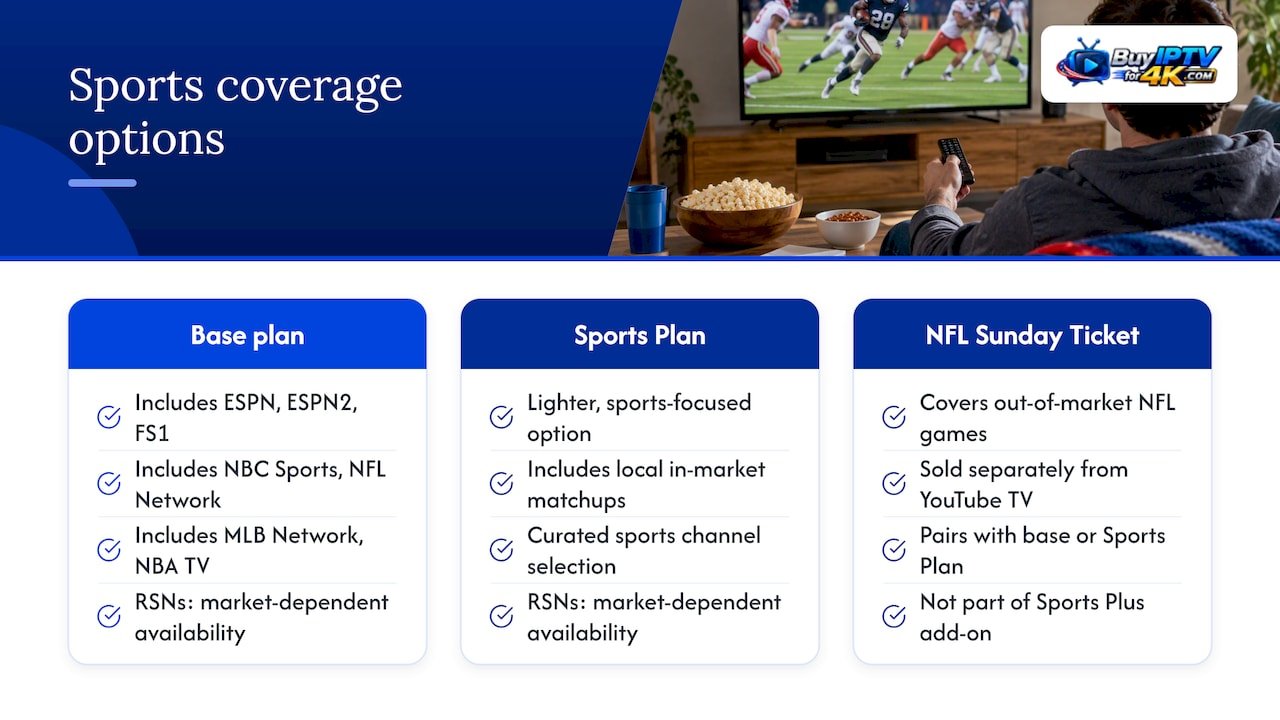
Sports coverage is one of the stronger parts of the base plan. YouTube TV carries ESPN, ESPN2, FS1, NBC Sports, and NFL Network, along with conference-specific networks like SEC Network and ACC Network in many markets, plus MLB Network and NBA TV for fans who follow those leagues year-round. Regional sports networks are the exception: RSN availability depends heavily on carriage agreements in your specific market, so a channel that shows up for one subscriber may not show up for their neighbor on a different cable footprint.
For viewers who want a lighter, sports-focused option, YouTube TV offers a Sports Plan that includes local in-market matchups and a curated sports channel selection separate from the full main plan. On top of either plan, Sports Plus is available as an add-on that brings in NFL RedZone and additional sports networks for viewers who want deeper coverage than the base lineup provides. Fans chasing out-of-market NFL games typically pair this setup with NFL Sunday Ticket, which is sold separately from YouTube TV’s own plans.
Pro Tip: Before adding Sports Plus for a specific team, check whether your ZIP code’s RSN is actually part of YouTube TV’s current carriage deals, since blackout and regional restrictions can limit what the add-on delivers.
4. Notable channels commonly missing from YouTube TV
No live TV streaming service carries everything, and YouTube TV is no exception. According to recent reviews, commonly absent channels include A&E, Lifetime, some History Channel programming, Cooking Channel, and a handful of niche music and science networks that show up on cable but not on most streaming bundles.
If one of these is a must-have, a few workarounds exist:
- Check whether the network offers its own standalone app with a login option.
- Look at whether a paid add-on covers a close substitute for the missing content.
- Combine YouTube TV with a separate service if the gap is a dealbreaker rather than a minor inconvenience.
Carriage deals shift often, so a channel missing today could return next quarter. Running a fresh ZIP lookup before you cancel or switch plans is the fastest way to confirm current status.
5. How to check your exact lineup and fix common issues
Checking your own ZIP-specific lineup takes just a few minutes and solves most “is this channel included” questions before they become a problem.
- Go to the YouTube TV welcome page or your account settings and enter your ZIP code to pull up the exact channel list for your area.
- Open membership settings to view or add add-ons like Sports Plus, and confirm availability before assuming a sports network is included.
- If a channel still looks wrong, verify your device’s location permissions and confirm your account’s home area matches your actual address, since these settings are the first thing to check when a channel seems to be missing.
- Restart the app if a channel loads incorrectly after those checks, and contact YouTube TV support directly if the issue persists after a restart.
Most “missing channel” complaints trace back to a location or home-area mismatch rather than an actual gap in the lineup, so start there before assuming the network was dropped.
6. How we think about channel composition when comparing services
We weigh channel breadth, local coverage accuracy, and how a service handles RSNs and add-on pricing before recommending anything to a reader. A plan with a big number on paper can still disappoint if half of it depends on a ZIP code that doesn’t apply to you, so we push readers toward checking their own lineup rather than trusting a generic list. Our cost breakdown guides build on that same ZIP-aware approach.
— ANASS
7. Compare plans before you commit to one service
Once you know which channels matter to you, the real question is whether YouTube TV’s price fits what you’re actually using. Our streaming service comparisons walk through how YouTube TV stacks up against other live TV options once RSN fees and sports add-ons are factored in, and our guide to IPTV options in the U.S. covers alternatives if you’re weighing a different path entirely.

If you want a clearer picture of what you’d actually pay after add-ons, check our breakdown on reducing YouTube TV costs before you sign up.
Sources
- Watch shows, sports, events, & movies on YouTube TV – YouTube TV Help
- YouTube TV Review: Is It Worth It? – Allconnect
FAQ
Which TV channels are available on YouTube TV?
YouTube TV’s main plan includes more than 100 channels, covering major broadcast networks like ABC, CBS, NBC, and FOX along with sports, news, kids, and lifestyle channels. Your exact local channels depend on your ZIP code, so the full list varies by market.
What major channels are missing from YouTube TV?
Commonly missing channels include A&E, Lifetime, some History Channel programming, and Cooking Channel, according to recent reviews. Carriage deals change over time, so it’s worth checking your ZIP-specific lineup before assuming a channel is permanently absent.
How do I find a list of YouTube TV channels?
Enter your ZIP code on the YouTube TV welcome page or in your account settings to see the exact channel list for your home area. You can also search for a specific network by name within the app to confirm it’s included.
What are the 100 YouTube TV channels?
YouTube TV’s base plan carries over 100 channels, but the exact roster depends on your ZIP code, since local affiliates and some regional sports networks vary by market. The official channel list lets you confirm which of those channels apply to your specific address.